CWMA File Upload Instructions
Please bookmark this page or the file upload page. If you bookmark the shared sign-in screen, automatic redirects may not work.
Steps for uploading files:
Create an ISDA account.
-
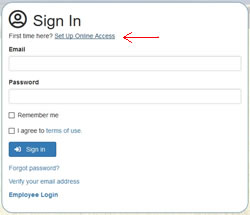
Click the "Set Up Online Access" link and create an ISDA account if you don't already have one. See images to the right.
Open Register Screen
Open Sign-in Screen
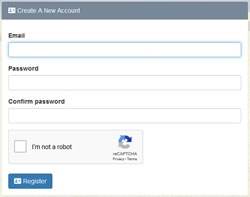
- An email will be sent to the address you entered with a verification link. Click the link to verify your email address. The email should arrive in a few minutes. If you don't see it, check your junk mail folder. If it's not in your junk mail, you can generate another email by clicking the link "Verify email address" on the sign-in screen. See image on the right.
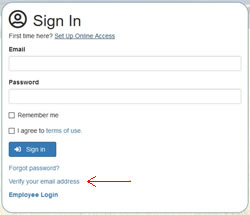
- Once your account has been created and verified, you can visit the CWMA file upload page. You will be automatically sent to the sign-in screen and redirected back after successfully entering your login credentials.
Uploading Files
- All files submitted through this portal must follow the outlined naming guidelines to ensure accurate reporting and tracking.
-
File Name - All file names will begin with the CWMAs name, followed by an underscore and the name of the file.
Example: HappyValley_1TermReport
*All file names should be kept as short as possible and no date is required as one will be assigned. - File Type - the following file types can be uploaded: Adobe Acrobat, Microsoft Excel and Word, most image files, shapefiles (dbf, prj, sbn, sbx, shp, shx, cpg), kmz, and compressed zip files.
- File Size - files cannot be larger than 200 MB.
- To ensure all files where uploaded please send an email to Jeremey.varley@isda.idaho.gov as notification of your CWMAs uploads.